Onwards And Upwards
If you've been paying attention over the last few weeks, you should now have a pretty clear idea of what XML is all about, together with some insight into its capabilities and lexical rules. You should clearly understand the difference between elements and attributes, between CDATA and PIs. In fact, if I've done my job right, you should be so excited about XML that you've spent the past two weeks converting your entire address book, desk calendar and stock portfolio into XML-compliant markup...
Keep in mind, though, that marking data up in XML is only half the battle; the other half involves using that XML data for something constructive (displaying a neatly-formatted list of addresses and phone numbers, highlighting those stocks which have shrunk to 10% of their original value, and so on.) However, XML is simply a tool to describe data; you can't use it to affect layout or presentation and, in fact, you shouldn't even attempt to, since one of XML's original design goals was to separate data from its presentation.
Obviously, then, there needs to be some other way to present marked-up XML data. And there is - XML's sister technology, XSLT, or Extensible Stylesheet Language Transformations. Over the course of this tutorial, I'm going to explain how XSLT works, together with a few simple (and not-so-simple) examples of how you can use it to get the most out of your XML data. Keep reading!
A Quick History Lesson
Before we begin, I'll spend a few minutes discussing the need and rationale for XSLT.
XSL, the Extensible Stylesheet Language, is a general-purpose language to define the presentation and formatting of XML data. While XSL originally started out as a single language, development quickly split it into two independent components: a language for "transforming" XML documents by reorganizing and restructuring XML data trees (known as XSLT), and an XML vocabulary to handle the formatting and layout of the result (now known as XSL or, sometimes, XSL-FO).
XSLT originated as a subset of the Document Style Semantics and Specification Language, or DSSSL, which was developed to control the presentation of SGML documents. The very first XSL proposal was submitted to the W3C in August 1997, and was followed by the formation of a W3C Working Group in January 1998. The first Working Draft for XSL 1.0 made its appearance in July 1998, with the W3C Recommendation appearing a little over a year later, in November 1999. Work is now on to bring the second version of the language, XSLT 1.1, to Recommendation status, with new Working Drafts appearing at irregular intervals on the W3C's Web site.
Quick aside: if you think about it, it's kind of fitting that the transformation language for XML (which is itself a subset of SGML) should also originate from the same family.
The need for XSL and its related technologies arises on account of the fact that XML merely describes data; it includes no formatting instructions or display specifications. Consequently, a stylesheet (or set of stylesheets) is necessary in order to make practical use of the information encoded within an XML document. By separating presentation semantics from data, it becomes possible to display multiple views of the same data, export the same information to a variety of different formats, and make a clear distinction between the twin activities of data compilation and data presentation.
This tutorial will focus exclusively on XSLT, which offers some high-level tools to reorganize data from am XML document into a completely new form; these tools allow document authors to select individual nodes, group them into different combinations, and perform arithmetic and string operations on them to generate new views of the same data.
Up A Tree
An XSLT transformation essentially consists of converting an XML "source tree" into a new - and usually completely different - "result tree". This is accomplished by means of an XSLT stylesheet, which contains one or more template rules. A template rule performs two functions: it first identifies a pattern to match in the source tree, and then describes the structure of the desired result tree. It is this process of transforming - or as Calvin would say, transmogrifying - the source tree into the result tree that gives XSLT its name.
Consider the following example:
<xsl:template match="/">
    My name is <xsl:value-of select="name" />
</xsl:template>
In this case, the template rule matches the root of the XML source tree, looks for the "name" element and print a string containing the value of that element.
The body of a template rule may contain a sequence of character data, which is reproduced as is, and/or XSLT processing instructions, which are executed by the processor. For example, the following template rule contains an XSLT processing instruction to loop a certain number of times, enclosed within non-XSLT text fragments.
<xsl:template match="/list">
    <xsl:for-each select="item">
    Item: <xsl:value-of select="."/><br/>
    </xsl:for-each>
</xsl:template>
An XSLT stylesheet may contain one or more template rules. Each rule typically applies to a specific node (or set of nodes) in the source tree, executes a set of instructions to create the structure of the corresponding node(s) in the result tree, and also specifies whether processing should continue recursively (to the children of the current node) or stop at that point itself.
In case processing is to continue recursively, the XSLT processor looks for a template rule matching the next element in the source tree, creates the corresponding result tree fragment, and continues recursively until it runs out of nodes or template rules. The end-product is thus the result of interaction between different template rules.
In case more than one template rule matches a specific element in the source tree, XSLT conflict resolution states that the most specific rule is applied. You'll see an example of this a little further down.
Test Drive
In order to see XSLT in action, let's build a simple XML file and combine it with an XSLT stylesheet to output some HTML.
Here's a simple XML document,
<?xml version="1.0"?>

<me>
    <name>John Doe</name>

    <address>94, Main Street, Nowheresville 16463, XY</address>

    <tel>738 2838</tel>

    <email>johndoe@black.hole.com</email>

    <url>http://www.unknown_and_unsung.com/</url>
</me>
which I would like to convert into the following HTML document.
<html>
<head></head>
<body>

<h1>Contact information for <b>John Doe</b></h1>

<h2>Mailing address</h2>
94, Main Street, Nowheresville 16463, XY

<h2>Phone:</h2>
738 2838

<h2>Email adress:</h2>
johndoe@black.hole.com

<h2>Web site URL:</h2>
http://www.unknown_and_unsung.com/

</body>
</html>
Here's the stylesheet to accomplish the transformation:
<?xml version="1.0"?>

<xsl:stylesheet version="1.0"
xmlns:xsl="http://www.w3.org/1999/XSL/Transform">

<xsl:template match="/">

    <html>
    <head>
    </head>
    <body>
    <h1>Contact information for <b><xsl:value-of select="me/name" /></b></h1>

    <h2>Mailing address:</h2>
    <xsl:value-of select="me/address" />

    <h2>Phone:</h2>
    <xsl:value-of select="me/tel" />

    <h2>Email address:</h2>
    <xsl:value-of select="me/email" />

    <h2>Web site URL:</h2>
    <xsl:value-of select="me/url" />

    </body>
    </html>

</xsl:template>

</xsl:stylesheet>
As you can see, an XSLT stylesheet is actually nothing more than a well-formed XML document. It even begins with the standard XML document prolog, which specifies the XML version and document character set.
<?xml version="1.0"?>This is followed by the standard XSLT heading, which includes a namespace declaration.
<xsl:stylesheet version="1.0"
xmlns:xsl="http://www.w3.org/1999/XSL/Transform">
This namespace declaration tells the parser that elements specific to XSLT will be declared with the xsl: prefix; this is necessary both to avoid clashes with user-defined element names, and to allow the parser to distinguish between XSLT instructions and non-XSLT elements. Elements without the xsl: prefix will be treated as literal data and moved to the result tree as is.
An XSLT stylesheet may include or import other stylesheets; however, this inclusion must happen at the top level of the XSLT document itself, as demonstrated below:
<?xml version="1.0"?>

<xsl:stylesheet version="1.0"
xmlns:xsl="http://www.w3.org/1999/XSL/Transform">

<xsl:import href="beta.xsl" />

<xsl:include href="alpha.xsl" />

<xsl:template match="/">
    ...
</xsl:template>

</xsl:stylesheet>
Note that while included template rules are treated as equivalent to the rules in the importing stylesheet, imported template rules are treated as having lower priority than the rules in the importing stylesheet. Imports must precede includes in the stylesheet definition.
Next comes the template rule, which first sets up the pattern to be matched (using an XPath expression),
<xsl:template match="/">
    ...
</xsl:template>
and then specifies the structure of the result tree when a match is found.
<xsl:template match="/">

    <html>
    <head>
    </head>
    <body>
    <h1>Contact information for <b><xsl:value-of select="me/name" /></b></h1>

    <h2>Mailing address:</h2>
    <xsl:value-of select="me/address" />

    <h2>Phone:</h2>
    <xsl:value-of select="me/tel" />

    <h2>Email address:</h2>
    <xsl:value-of select="me/email" />

    <h2>Web site URL:</h2>
    <xsl:value-of select="me/url" />

    </body>
    </html>

</xsl:template>
The
<xsl:value-of />instruction is used to display the value of a particular element with the XML source tree, and is one of the most common XSLT instructions you'll see in a stylesheet.
It should be noted at this point that XSLT template rules rely heavily on XPath expressions and location paths to identify which areas of the document to match. In case you're not familiar with XPath, you should take a look at our XPath tutorial at http://www.melonfire.com/community/columns/trog/article.php?id=83 before proceeding.
Once the stylesheet is ready, it needs to be hooked up with an XML document; this can be accomplished by adding a PI to the XML document which references the stylesheet, as follows:
<?xml:stylesheet type="text/xsl" href="mystyle.xsl"?>Now that both data and stylesheet are ready, it's time to apply the transformation. A variety of tools are available to do this for you - my personal favourites are Sablotron, at http://www.gingerall.com/ and Saxon, at http://sourceforge.net/projects/saxon/, although you might also want to check out Xalan, at http://xml.apache.org/xalan-c/ or the software page at http://www.oasis-open.org/cover/xslSoftware.html. For those of you who don't like command-line tools, Microsoft Internet Explorer 5.5 comes with a built-in MSXML parser which can also handle stylesheet transformations - download the latest version from http://msdn.microsoft.com/xml/default.asp, and check out http://www.netcrucible.com/xslt/msxml-faq.htm if you have trouble getting it up and running.
Note that some XSLT processors, like Sablotron for Windows, balk at the
<?xml:stylesheet type="text/xsl" href="mystyle.xsl"?>PI, and prefer that you specify the stylesheet on the command line itself.
Here's the result of the transformation:
<html><head></head><meta http-equiv="Content-Type" content="text/html;
charset=UTF-8"><body><h1>Contact information for <b>John
Doe</b></h1><h2>Mailing address:</h2>94, Main Street, Nowheresville 16463,
XY<h2>Phone:</h2>738 2838<h2>Email
address:</h2>johndoe@black.hole.com<h2>Web site
URL:</h2>http://www.unknown_and_unsung.com/</body></html>
An Evening At The Moulin Rouge
The preceding example used a single template rule to generate the entire document. While this technique is adequate for simple documents, it becomes difficult to maintain such a stylesheet for a long and complex source tree. Hence XSLT also supports multiple template rules within the same stylesheet, with instructions which tell the processor to recursively traverse the tree for child elements wherever necessary.
I'll illustrate this with a somewhat more complex XML document:
<?xml version="1.0"?>

<review id="57" category="2">

    <title>Moulin Rouge</title>

    <cast>
        <person>Nicole Kidman</person>
        <person>Ewan McGregor</person>
        <person>John Leguizamo</person>
        <person>Jim Broadbent</person>
        <person>Richard Roxburgh</person>
    </cast>

    <director>Baz Luhrmann</director>

    <duration>120</duration>

    <genre>Romance/Comedy</genre>

    <year>2001</year>

    <body>
A stylishly spectacular extravaganza, <title>Moulin Rouge</title> is hard
to categorize;
it is, at different times, a love story, a costume drama, a musical, and a
comedy. Director <person>Baz Luhrmann</person> (well-known for the very hip
<title>William
Shakespeare's Romeo + Juliet</title>) has taken some simple themes - love,
jealousy and obsession - and done something completely new and different
with them by setting them to music.
    </body>

    <rating>5</rating>

    <teaser>Baz Luhrmann's over-the-top vision of Paris at the turn of the
century is witty, sexy...and completely unforgettable</teaser>

</review>
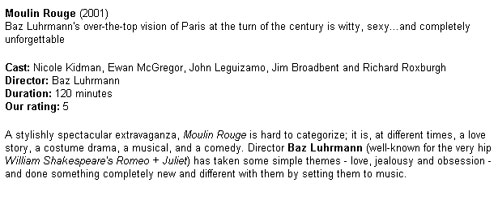
Now, I'd like to present this raw data as the following HTML page:
Let's look at the stylesheet:
<?xml version="1.0"?>

<xsl:stylesheet version="1.0"
xmlns:xsl="http://www.w3.org/1999/XSL/Transform">

<xsl:template match="/review">
    <html>
    <head>
    <basefont face="Arial" size="2"/>
    </head>
    <body>
    <xsl:apply-templates select="title"/> (<xsl:apply-templates select="year"/>)
    <br />
    <xsl:apply-templates select="teaser"/>
    <p />
    <xsl:apply-templates select="cast"/>
    <br />
    <xsl:apply-templates select="director"/>
    <br />
    <xsl:apply-templates select="duration"/>
    <br />
    <xsl:apply-templates select="rating"/>
    <p>
    <xsl:apply-templates select="body"/>
    </p>
    </body>
    </html>
</xsl:template>

<xsl:template match="title">
<b><xsl:value-of select="." /></b>
</xsl:template>

<xsl:template match="teaser">
<xsl:value-of select="." />
</xsl:template>

<xsl:template match="director">
<b>Director: </b> <xsl:value-of select="." />
</xsl:template>

<xsl:template match="duration">
<b>Duration: </b> <xsl:value-of select="." /> minutes
</xsl:template>

<xsl:template match="rating">
<b>Our rating: </b> <xsl:value-of select="." />
</xsl:template>

<xsl:template match="cast">
<b>Cast: </b>
<xsl:apply-templates/>
</xsl:template>

<xsl:template match="person[position() != last()]">
<xsl:value-of select="." />,
</xsl:template>

<xsl:template match="person[position() = (last()-1)]">
<xsl:value-of select="." />
</xsl:template>

<xsl:template match="person[position() = last()]">
and <xsl:value-of select="." />
</xsl:template>

<xsl:template match="body">
    <xsl:apply-templates/>
</xsl:template>

<xsl:template match="body//title">
    <i><xsl:value-of select="." /></i>
</xsl:template>

<xsl:template match="body//person">
    <b><xsl:value-of select="." /></b>
</xsl:template>

</xsl:stylesheet>
And the output after running the transformation:
<html>
<head><meta http-equiv="Content-Type" content="text/html; charset=UTF-8">
<basefont face="Arial" size="2">
</head>
<body>
<b>Moulin Rouge</b> (2001)

<br>Baz Luhrmann's over-the-top vision of Paris at the turn of the century
is witty, sexy...and completely unforgettable<p></p>

<b>Cast: </b>
Nicole Kidman, Ewan McGregor, John Leguizamo, Jim Broadbent and Richard
Roxburgh

<br><b>Director: </b>Baz Luhrmann

<br><b>Duration: </b>120 minutes

<br><b>Our rating: </b>5

<p>
A stylishly spectacular extravaganza, <i>Moulin Rouge</i> is hard to
categorize;  it is, at different times, a love story, a costume drama, a
musical, and a comedy. Director <b>Baz Luhrmann</b> (well-known for the
very hip <i>William Shakespeare's Romeo + Juliet</i>) has taken some simple
themes - love, jealousy and obsession - and done something completely new
and different with them by setting them to music.        </p>
</body>
</html>
Let's dissect this a little. Everything you've just seen stems from the first stylesheet rule, which sets up the order in which I want the various bits of information to appear.
<xsl:template match="/review">
    <html>
    <head>
    <basefont face="Arial" size="2"/>
    </head>
    <body>
    <xsl:apply-templates select="title"/> (<xsl:value-of select="year"/>)
    <br />
    <xsl:apply-templates select="teaser"/>
    <p />
    <xsl:apply-templates select="cast"/>
    <br />
    <xsl:apply-templates select="director"/>
    <br />
    <xsl:apply-templates select="duration"/>
    <br />
    <xsl:apply-templates select="rating"/>
    <p>
    <xsl:apply-templates select="body"/>
    </p>
    </body>
    </html>
</xsl:template>
This template rule looks for the element "review" - the outermost element - in the source tree - and replaces it with the standard HTML headers in the corresponding result tree. Within the body of the result document, it inserts placeholders for the different pieces of information; each of these placeholders is actually a reference to another template rule.
The
<xsl:apply-templates />instruction tells the XSLT processor to process all the children of the current node. In case this is too all-inclusive for you, you can refine the list of children to process with an additional "select" attribute, as I've done in the example above.
While processing the child nodes, the XSLT processor will look for matching templates and apply them wherever possible. In the example above, when the processor receives the instruction
<xsl:apply-templates select="teaser"/>it attempts to find and process template rules matching the element "teaser".
<xsl:template match="teaser">
<xsl:value-of select="." />
</xsl:template>
Similarly, I have instructions for the other descriptive information,
    <xsl:apply-templates select="title"/> (<xsl:value-of select="year"/>)

    <xsl:apply-templates select="director"/>

    <xsl:apply-templates select="duration"/>

    <xsl:apply-templates select="rating"/>
and appropriate templates for each:
<xsl:template match="title">
<b><xsl:value-of select="." /></b>
</xsl:template>

<xsl:template match="director">
<b>Director: </b> <xsl:value-of select="." />
</xsl:template>

<xsl:template match="duration">
<b>Duration: </b> <xsl:value-of select="." /> minutes
</xsl:template>

<xsl:template match="rating">
<b>Our rating: </b> <xsl:value-of select="." />
</xsl:template>
Look what happens when the XSLT processor finds a "body" element:
<xsl:template match="body">
    <xsl:apply-templates/>
</xsl:template>
In this case, the template rule simply tells the processor to act on its children as per other templates which may exist within the stylesheet (strictly speaking, this rule is not really necessary)...and here they are:
<xsl:template match="body//title">
    <i><xsl:value-of select="." /></i>
</xsl:template>

<xsl:template match="body//person">
    <b><xsl:value-of select="." /></b>
</xsl:template>
Now, if you take a look at the XML document, you'll notice that the "title" element occurs in two places - once as the title of the review, and multiple times within the body (to identify movie references). Obviously, I'd like to treat these two occurrences differently - the former should be highlighted as the review title, while the latter should be italicized within the body.
I'll have XSLT base its decision on the context in which it finds the "title" element - consider these two rules, which do exactly what I need:
<xsl:template match="title">
<b><xsl:value-of select="." /></b>
</xsl:template>

<xsl:template match="body//title">
    <i><xsl:value-of select="." /></i>
</xsl:template>
Remember what I told you about conflict resolution? Here's an example - the XSLT processor will never apply the first rule to "title" elements within the body, because there already exists a more specific rule to override it.
In case you're wondering about these,
<xsl:template match="person[position() != last()]">
<xsl:value-of select="." />,
</xsl:template>

<xsl:template match="person[position() = (last()-1)]">
<xsl:value-of select="." />
</xsl:template>

<xsl:template match="person[position() = last()]">
and <xsl:value-of select="." />
</xsl:template>
they're simply there to create a grammatically correct string of cast members, and make sure that the commas are all in the right places. The position() and last() functions are XPath functions, and come in very handy if you need to identify the position of any node in a collection.
By using multiple template rules to control the markup of different elements in the result tree, XSLT makes it possible to break up a complex stylesheet into smaller chunks and thereby easily handle long and convoluted XML data. Breaking up a stylesheet in this manner also makes it simpler to add (or remove) individual template rules for specific elements or sets of elements. The template rules individually create fragments of the result tree; these fragments are then combined into a composite result tree.
Little Black Book
One more example, this one demonstrating how powerful this ability to recursively apply templates is. Consider the following example:
<?xml version="1.0"?>
<?xml:stylesheet type="text/xsl" href="address.xsl"?>

<addressbook>

    <record>
        <name>John Smith</name>
        <street>24, Main Street</street>
        <city>Poodle Springs</city>
        <zip>16628</zip>
        <country>USA</country>
    </record>

    <record>
        <name>Sherlock Holmes</name>
        <street>122B, Baker Street</street>
        <city>London</city>
        <zip>12367</zip>
        <country>United Kingdom</country>
    </record>

    <record>
        <name>Jane Doe</name>
        <street>64 Fedwikstrasse</street>
        <city>Antwerp</city>
        <zip>848222</zip>
        <country>Brussels</country>
    </record>

</addressbook>
Now, since this data follows a very simple structure, and moreover I'm not very concerned about the order in which the various records appear, I can format it and present it as HTML with just two XSLT template rules:
<?xml version="1.0"?>

<xsl:stylesheet version="1.0"
xmlns:xsl="http://www.w3.org/1999/XSL/Transform">

<xsl:template match="/addressbook">
    <html>
    <head>
    <basefont face="Arial" size="2"/>
    </head>
    <body>
    <h1>My Address Book</h1>
    <xsl:apply-templates />
    </body>
    </html>
</xsl:template>

<xsl:template match="record">
<b><xsl:value-of select="name" /></b>
<br />
<xsl:value-of select="street" />
<br />
<xsl:value-of select="city" /> - <xsl:value-of select="zip" />
<br />
<xsl:value-of select="country" />
<p />
</xsl:template>

</xsl:stylesheet>
The first rule locates the document element and places the standard HTML headers and footers in the corresponding positions in the result tree. Next, the
<xsl:apply-templates />instruction processes all the children of this node - in this case, these are all "record" elements, for which there is a corresponding template rule. Each time a record is located via the "record" element, the template rule is invoked and a new fragment added to the result tree. At the end of the process, a composite tree is built out of all the different chunks - and it looks like this:
<html>
<head>
<basefont face="Arial" size="2">
</head>
<body>
<h1>My Address Book</h1>

<b>John Smith</b><br>24, Main Street<br>Poodle Springs - 16628<br>USA<p></p>

<b>Sherlock Holmes</b><br>122B, Baker Street<br>London - 12367<br>United
Kingdom<p></p>

<b>Jane Doe</b><br>64 Fedwikstrasse<br>Antwerp - 848222<br>Brussels<p></p>

</body>
</html>
And that just about covers the essential concepts behind XSL transformations. In the second part of this article, I will be looking at a few of XSLT's more advanced constructs, demonstrating how to add loops and conditional tests to your XSLT templates.
Note: All examples in this article have been tested on Microsoft Internet Explorer 5.5 and Saxon 6.4.3. Examples are illustrative only, and are not meant for a production environment. YMMV!
This article was first published on10 Aug 2001.