The Insomnia Cure
To the uninitiated, XML can often seem more trouble than it's worth. There's the complex jargon, the fundamentally different design principles, the confusing array of technologies, each with its own unpronounceable acronym, and - probably the most annoying aspect - the long and convoluted specifications, most of which immediately induce drowsiness and deep sleep...
Once you've figured out the basics, though, and played with the tools a little - even if it's something as simple as marking up your to-do list and transforming it with XSLT - it quickly becomes obvious that this is a technology with tremendous potential. By providing a set of rules for data description, together with the technology necessary to transform and present this data, XML opens up whole new possibilities for better (read: more efficient) data interpretation, usage and exchange.
Now, while these applications are certainly not restricted to the Internet, the Web is still XML's most potent proving ground. And if XML is to succeed on the Web, it needs to find a way to incorporate the most fundamental construct of the wired universe - in fact, the very thing that makes the Web so powerful.
Links.
Luckily, you and I are not the only people in the room who've realized this. The guys who came up with XML know it too, and they've expended an enormous amount of time, energy and brainpower on coming up with a way to link XML data and documents together. It's called XLink, and it's easily one of the most interesting pieces of the XML jigsaw. Keep reading, and I'll tell you why.
Out With The Old...
Before getting into the details of how XLink works, it's important to understand the context in which it was developed, and the need and rationale behind it.
You already know that HTML comes with a way to link documents together - it's called the anchor tag, and it's the standard way of creating connections between different pieces of information in today's version of the Web. However, although the anchor tag is simple to understand and easy to use, it has a couple of drawbacks:
-
Every HTML link connects a single source to a single destination; it's not possible to have a single link point to multiple destinations.
-
Only specific, pre-defined HTML elements - the
<A>tag, for example - can serve as links. -
The definition of a link (the location it points to) cannot be separated from its source (the file in which it is contained.) Or to put it another way - you can't create a link without write permission to the source document.
These drawbacks might seem trivial in the context of today's Internet - it ain't broke, you're probably thinking, so why fix it? - but they assume serious proportions in the context of an XML world, which is built around data and the relationships inherent in it.
XLink was designed to address these drawbacks.
If you take a look at the requirements document for XLink - it's available online at http://www.w3.org/TR/NOTE-xlink-req - you'll see that XLink was designed to represent links in an abstract yet easily-understandable and usable manner. To this end, the XLink specification states the XLinks must:
-
be defined using standard XML constructs, and follow the rules of well-formed XML;
-
be human-readable;
-
express information on the nature of the link (the type of link, its title and destination, or its endpoints) as well as its behaviour (the rules by which a link processor can access or traverse the link);
-
support multiple destinations;
-
allow link authors to define link endpoints and traversal rules without requiring write access to either the source or destination resource;
-
provide constructs to allow link authors to control the direction of travel between links;
-
maintain compatibility with existing HTML4 linking constructs.
...In With The New
Given these requirements, XLink's authors have considered the linking process and broken it up into three distinct and atomic parts, which I will define below:
The "link definition", which clearly defines the relationship between the items to be linked;
The "participating resources", or the items connected together by an XLink - these resources may be local (stored within the same physical document) or remote (stored within a different document);
"Traversal rules" or "arcs", which specify the direction of traversal between a pair of participating resources. Arcs may be "outbound" (local resource to remote resource), "inbound" (remote resource to local resource) or "third-party" (remote resource to remote resource.)
Using these three basic constructs, it becomes possible to create links which satisfy all the requirements stated above. Take a look at the example below, which illustrates these concepts:
<?xml version="1.0"?>

<performers xmlns:xlink="http://www.w3.org/1999/xlink">
    <item xlink:type="extended">
        <!-- link definition (local) -->
        <link xlink:type="resource" xlink:label="overview" xlink:title="Information on Sinatra">Frank Sinatra</link>

        <!-- link definitions (remote) - Sinatra's biography, songs and articles -->
        <link xlink:type="locator" xlink:href="bio.xml" xlink:label="bio" xlink:title="Biography" />
        <link xlink:type="locator" xlink:href="songs.xml" xlink:label="songs" xlink:title="Songs"/>
        <link xlink:type="locator" xlink:href="press.xml" xlink:label="press" xlink:title="Press articles" />

        <!-- local to remote arc - from name to biography -->
        <arc xlink:type="arc" xlink:from="overview" xlink:to="bio" xlink:show="replace" xlink:actuate="onRequest" />

        <!-- remote to remote arc - from biography to song list -->
        <arc xlink:type="arc" xlink:from="bio" xlink:to="songs" xlink:show="replace" xlink:actuate="onRequest" />

        <!-- remote to remote arc - from biography to press archive -->
        <arc xlink:type="arc" xlink:from="bio" xlink:to="press" xlink:show="replace" xlink:actuate="onRequest" />
    </item>
</performers>
This example sets up conceptual links between a performer (the evergreen Frank Sinatra), his biography, his songs, and an archive of press articles about him. Arcs specify the direction of link traversal - they allow for navigation between the performer and his biography, between the biography and a song list, and between the biography and an archive of press clippings.
It's important to note at this point that XLinks are not expressed as elements, but as element attributes (from the XLink namespace) which can be attached to any XML element; the most important of these is the XLink "type" attribute, which specifies the type of link being defined. The example above uses this attribute to define four types of links: extended links, resources, locators and arcs (more on these later).
By allowing any XML element to become an XLink, the XLink specification substantially improves on HTML's current linking mechanism, which only allows the anchor tag to define links. In the example above, the "item", "link" and "arc" XML elements have been converted to XLinks by the addition of specific attributes from the XLink namespace.
Depending on the value of the XLink "type" attribute, one or more XLink attributes are required to provide additional information about the link - the XLink specification lays down the basic rules and constraints for each of these. In the example above, you can see that XLinks of type "locator" have an additional "href" attribute, while XLinks of type "arc" display "from" and "to" attributes.
Keeping It Simple
XLink allows for the construction of two basic types of links: simple and extended.
Simple links are the ones you've been used to for so long - anchor-tag-style hyperlinks which link two resources together, with a clearly-defined direction of traversal. Since these types of links are the most common, they've been included in the XLink specification as "shortcuts" for link authors who don't need all the power and flexibility of extended links.
Here's an example:
<?xml version="1.0"?>
<performers xmlns:xlink="http://www.w3.org/1999/xlink">
    <item xlink:type="simple" xlink:href="bio.xml">Sinatra's biography</item>
    <item xlink:type="simple" xlink:href="songs.xml">Song list</item>
    <item xlink:type="simple" xlink:href="press.xml">Press clippings</item>
</performers>
This is very similar to the standard linking construct used in today's HTML pages - if you recreated the links above in HTML, you would see something like this:
<html>
<head>
</head>
<body>
<a href="bio.xml">Sinatra's biography</a>
<a href="songs.xml">Song list</a>
<a href="press.xml">Press clippings</a>
</body>
</html>
Extended links, on the other hand, are a completely different beast. They allow link authors to create new types of links, typically by using arcs to create relationships (via multiple traversal rules) between many different local and remote resources. Since extended links connect many resources together, they are typically stored separately from the resources they link together - and, if you've been paying attention, you'll immediately realize this implies that it now becomes possible to update link definitions without requiring write access to either source or destination(s).
Consider the following diagram, which sets up links between an employee's profile, salary and performance appraisal,
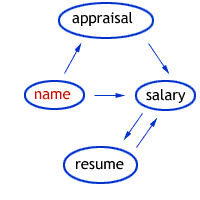
and then look at how you could represent these relationships with XLink.
<?xml version="1.0"?>

<ext xmlns:xlink="http://www.w3.org/1999/xlink" xlink:type="extended">

    <!-- starting point - employee's name (local) -->
    <local xlink:type="resource" xlink:label="name" xlink:title="John Doe" />

    <!-- employee's salary (remote) -->
    <remote xlink:type="locator" xlink:href="salary.xml" xlink:label="salary" xlink:title="John Doe's salary information" />

    <!-- employee's last appraisal (remote) -->
    <remote xlink:type="locator" xlink:href="appraisal.xml" xlink:label="appraisal" xlink:title="John Doe's last performance appraisal" />

    <!-- employee's resume (remote) -->
    <remote xlink:type="locator" xlink:href="resume.xml" xlink:label="resume" xlink:title="John Doe's resume" />

    <!-- link name to resume  -->
    <arc xlink:type="arc" xlink:from="name" xlink:to="resume" xlink:show="replace" xlink:actuate="onRequest" xlink:title="Link from name to resume" />

    <!-- link name to current salary -->
    <arc xlink:type="arc" xlink:from="name" xlink:to="salary" xlink:show="replace" xlink:actuate="onRequest" xlink:title="Link from name to salary" />

    <!-- link last appraisal to current salary-->
    <arc xlink:type="arc" xlink:from="appraisal" xlink:to="salary" xlink:show="replace" xlink:actuate="onRequest" xlink:title="Link from appraisal to salary" />

    <!-- these next two arcs set up a bidirectional link -->
    <!-- link qualifications to salary -->
    <arc xlink:type="arc" xlink:from="resume" xlink:to="salary" xlink:show="replace" xlink:actuate="onRequest" xlink:title="Link from resume to salary" />

    <!-- link salary to qualifications -->
    <arc xlink:type="arc" xlink:from="salary" xlink:to="resume" xlink:show="replace" xlink:actuate="onRequest" xlink:title="Link from salary to resume" />

</ext>
An extended link (or, to be more precise, an XML element containing an extended link) is actually nothing more than a wrapper around other XLink definitions for local and remote participating resources and arcs.
<ext xmlns:xlink="http://www.w3.org/1999/xlink" xlink:type="extended">
    <!-- participating resources -->
</ext>
These nested elements can represent any of the following four link types:
Resource: This link type represents a local resource which participates in the extended link. Typically, it contains some content which serves as the starting point for link traversal.
<local xlink:type="resource" xlink:label="name" xlink:title="John Doe" />Locator: This link type represents a remote resource (via the additional "href" attribute) which participates in the extended link.
<remote xlink:type="locator" xlink:href="salary.xml" xlink:label="salary" xlink:title="John Doe's salary information" />Arc: An arc sets up navigation rules between locators and resources (via the additional "from" and "to" attributes), and is the primary construct for specifying the direction and behaviour of link traversal.
<arc xlink:type="arc" xlink:from="name" xlink:to="salary" xlink:show="replace" xlink:actuate="onRequest" xlink:title="Link from name to salary" />Arcs come in very handy when setting up so-called bi-directional links - for example, A -> B and B -> A. Here's an example:
<arc xlink:type="arc" xlink:from="resume" xlink:to="salary" xlink:show="replace" xlink:actuate="onRequest" xlink:title="Link from resume to salary" />

<arc xlink:type="arc" xlink:from="salary" xlink:to="resume" xlink:show="replace" xlink:actuate="onRequest" xlink:title="Link from salary to resume" />
Now, however, that the XLink specification very clearly states that arcs cannot be duplicated - in other words, a particular from-to relationship can be represented by one and only one arc.
Title: This link type is used to provide additional, human-readable information for an extended link's participating resources. The XLink specification suggests that this link type is primarily used in the context of internationalization, where different languages may require different titles - for example,
<ext xmlns:xlink="http://www.w3.org/1999/xlink" xlink:type="extended">

    <greeting xlink:type="title" xml:lang="en">Hello!</greeting>
    <greeting xlink:type="title" xml:lang="fr">Bon jour!</greeting>
    <greeting xlink:type="title" xml:lang="it">Ciao!</greeting>

</ext>
Playing By The Rules
Now that you've seen the various XLink types in action, let's focus on the attributes available in the XLink namespace to provide more information on a particular link type or modify its behaviour.
Every element defining an XLink must contain a "type" attribute, which specifies what type of link it is - the value for this attribute may be any one of "simple", "extended", "locator", "arc", "resource", "title" or "none".
In addition to the "type" attribute, the XLink specification defines nine additional attributes:
The "href" attribute is used to specify the URL of a remote resource, and is mandatory for locator links. In addition to the URL of the remote resource, it may also contain an additional "fragment identifier", which drills down to a specific location within the target document.
The "show" attribute is used to define the manner in which the endpoint of a link is presented to the user. The value of this attribute may be any one of "new" (display linked resource in a new window); "replace" (display linked resource in the current window, removing whatever's currently there); "embed" (display linked resource in a specific area of the current window); "other" (display as per other, application-dependent directives); or "none" (display method unspecified)
The "actuate" attribute is used to specify when a link is traversed - it may take any of the values "onLoad" (display linked resource as soon as loading is complete); "onRequest" (display linked resource only when expressly directed to by the user, either via a click or other input); "other" and "none".
The "label" attribute is used to identify a link for subsequent use in an arc.
The "from" and "to" attributes are used to specify the starting and ending points for an arc respectively. Both these attributes use labels to identify the links involved.
The "role" and "arcrole" attributes reference a URL which contains information on the link's role or purpose. Most often, you can ignore these attribute, as they are intended primarily for descriptive purposes. The only exception to this is when the "arcrole" attribute used in conjunction with a linkbase - more on this later.
The "title" attribute, not to be confused with the title type of link, provides a human-readable descriptive title for a link.
It should be noted that it is not necessary for all these attributes to be present in a particular XLink definition. It is certainly mandatory for any element defining an XLink to contain a "type" attribute, but with this obvious exception, different types of links have different attribute requirements.
Here are the basic rules:
-
A simple link may contain an "href" attributes to define the remote resource, and optional "show" and "actuate" attributes to define link behaviour; however, none of these are mandatory.
-
An extended link may contain optional "role" and "title" attributes to define its purpose.
-
A locator link must contain an "href" attribute to define the URL of the remote resource. It typically also uses an optional "label" attribute to identify itself for arc traversals.
-
A resource link usually contains an optional "label", again for purposes of arc traversals.
-
An arc typically contains optional "from" and "to" attributes to define the direction of link traversal, optional "show" and "actuate" attributes to specify how and when to traverse links, and an optional "arcrole" attribute if used in the context of a linkbase.
A Little Experiment
If you go back a couple of pages and take another look at how simple links work, it should quickly become obvious to you that the function performed by a simple link is in fact a subset of the functions available in all extended links. XLink, however, has wisely chosen to pre-define simple links as a separate type, both to maintain compatibility with existing HTML4 constructs and to provide a simple shortcut for users who don't need extended link functionality.
It's an interesting experiment, though, to use an extended link (together with its associated resource, locator and arc) to recreate the functionality of a simple link, both as a validation of what you've learned thus far and an understanding of the reasoning behind the separation of the two types. Consider the following simple link.
<item xlink:type="simple" xlink:href="bio.xml">Sinatra's biography</item>This could be recreated as the following extended link:
<item xlink:type="extended" xmlns:xlink="http://www.w3.org/1999/xlink">

    <!-- name -->
    <loc xlink:type="resource" xlink:label="local" xlink:title="Frank Sinatra">Frank Sinatra</loc>

    <!-- bio -->
    <rem xlink:type="locator" xlink:href="bio.xml" xlink:label="remote" xlink:title="Biography" />

    <!-- local to remote arc - from name to biography -->
    <arc xlink:type="arc" xlink:from="local" xlink:to="remote" xlink:show="replace" xlink:actuate="onRequest" />

</item>
On a related note, it's also important to understand the difference between a simple link and a locator. A simple link both specifies a remote resource and sets up a one-way traversal rule between itself and the remote resource. A locator, on the other hand, simply specifies a remote resource; it does not automatically set up traversal rules between itself and the remote resource, as simple links do, but leaves that function to an arc.
Back To Base
You already know that XLink allows for inbound, outbound or third-party arcs. Most of the time, arcs are outbound - the direction of link traversal is from the local document to a remote resource - and XLink has no trouble identifying the starting point. However, when the starting point of link traversal is remote, XLink has no way of knowing where to find the link information to initiate the process of traversal.
It's precisely to address this kind of situation that the XLink specification allows for "linkbases" or link databases - essentially, well-formed XML documents that contain extended link information.
XLink defines a link to a linkbase by adding the value
http://www.w3.org/1999/xlink/properties/linkbaseto the arc's "arcrole" attribute. When an XLink link processor comes across such an arc definition, it locates the linkbase, loads the links within it and processes them as per its own built-in rules.
Here's an example of a country being linked to a linkbase of states:
<ext xmlns:xlink="http://www.w3.org/1999/xlink" xlink:type="extended">

    <!-- start from here -->
    <link xlink:type="resource" xlink:label="country" xlink:title="Country">United States</link>

    <!-- linkbase containing links to states -->
    <directory xlink:type="locator" xlink:href="states.xml" xlink:label="states" xlink:title="States within country" />

    <!-- special linkbase arc with arcrole attribute -->
    <arc xlink:type="arc" xlink:from="country" xlink:to="states" xlink:arcrole="http://www.w3.org/1999/xlink/properties/linkbase" xlink:show="replace" xlink:actuate="onRequest" />

</ext>
The XLink specification also raises the possibility of "chained" linkbases - one of the links within the linkbase is itself a link to another linkbase, and so on. While the idea is certainly interesting - think of a Yahoo!-type portal, composed entirely of interconnected XML linkbases - it remains to be seen how link authors would utilize this capability.
A Little More...
And that's about it for this introduction to the wild and incredibly elastic world of XLink. In case you'd like to learn more about it, you should consider visiting the following links:
The W3C's XLink specification, at http://www.w3.org/TR/2001/REC-xlink-20010627/
XLink design principles, at http://www.w3.org/TR/1998/NOTE-xlink-principles-19980303
The XLink requirements specification, at http://www.w3.org/TR/NOTE-xlink-req
Zvon's XLink reference, at http://zvon.org/xxl/xlink/Output/xlink_refs.html
The Fujitsu XLink Processor, at http://www.labs.fujitsu.com/free/xlip/en/index.html
While the promise of XLink is tremedously exciting, there are as yet very few implementations of the technology, and so it's hard to truly grasp many of the applications that it makes possible. However, as the technology matures, expect to see XLinks gradually taking over from standard anchor tags, and data being linked in new and interesting ways.
Until that happens, though - stay healthy, and I'll see you soon!
Note: All examples in this article have been tested on Microsoft Internet Explorer 5.5 and the Fujitsu Link Processor. Examples are illustrative only, and are not meant for a production environment. YMMV!
This article was first published on21 Sep 2001.